Business · Operations · Administration / AI Crew & controls
Specialists for the business, the mission, and the aircraft.
STERLING supports go-to-market, services, leads, and client relationships. TUCKER brings aircraft, component, and maintenance expertise across ArduPilot, PX4, MAVLink, and DJI fleets. MERIDIAN supports mission preparation; CONCORD supports procedures and readiness. Each works with the relevant AYNA context and tools.

The operational context
Bring domain expertise to the work already in progress.
Developing a service, preparing a client conversation, investigating a flight-log finding, and planning a maintenance action require different expertise. AYNA assigns those responsibilities to specialists working alongside the customer, mission, aircraft, and procedural records. Ask for an explanation, develop a recommendation, or use enabled tools to carry approved work into the relevant record.
STERLING / Business Partner
Build the offer. Develop the pipeline. Grow the business.
STERLING specializes in go-to-market work for a drone business: service positioning, pricing strategy, market opportunities, lead development, and client relationships. Develop service packages around the work you can deliver, prepare outreach and client conversations, and decide how to present the offer. With a lead in view, STERLING can use the request, contact history, notes, and available services to recommend the next step. Draft a follow-up, prepare for a meeting, or refine a service and its price. Where the relevant actions are enabled, approved service work can be recorded in AYNA.
Go-to-market strategy · services and pricing · leads and outreach · client follow-up
TUCKER / Maintenance Specialist
Understand the aircraft. Investigate the finding. Keep the history.
TUCKER specializes in aircraft systems, components, configuration, and maintenance, including ArduPilot and PX4 aircraft, MAVLink setups, and DJI equipment. Discuss the installed parts and recorded setup, work through a technical question, and interpret the log findings available in AYNA. TUCKER can explain what the evidence indicates, recommend inspections or maintenance actions, and help document the aircraft, components, and work performed. With the relevant tools enabled and your approval, that follow-up can become a maintenance task, component entry, or supporting record. Diagnostic depth depends on the available log format and data; AYNA’s built-in diagnostic engine analyzes ArduPilot .bin logs.
ArduPilot · PX4 · MAVLink · DJI · components and setups · maintenance recommendations

MERIDIAN / Flight Dispatcher
Prepare the mission with the crew and aircraft in view.
MERIDIAN specializes in mission preparation, scheduling, and dispatch. Review the mission objective and timing alongside the assigned pilots, aircraft, and related flight records. Use that context to work through preparation questions, identify information the crew still needs, and organize the next operational steps. The discussion stays connected to the mission your team is preparing and the resources assigned to it.
Mission preparation · scheduling · crew and aircraft assignments · operational follow-up

CONCORD / Compliance & Readiness Specialist
Connect the requirement, the checklist, and the evidence.
CONCORD specializes in compliance and operational readiness. Review pilot credentials, aircraft registration records, company rules, procedures, and checklist work. Understand how a requirement relates to the steps the team follows and the records retained for the operation. CONCORD helps identify missing information and explain the relevant readiness findings so the operator can address them. AYNA informs the RPIC; the flight decision remains with the pilot in command.
Credentials and registrations · rules and procedures · checklist coverage · readiness findings

05 / AI Crew & controls
Start with the record already in view.
A separate ChatGPT conversation can require you to assemble the customer, aircraft, or mission background before asking for help. AYNA passes relevant page and focus context into the conversation and can include associated record summaries and available flight diagnostics.
Page context · associated records · available diagnostics
06 / AI Crew & controls
Push to talk with your AI crew.
Tap the microphone to turn on voice mode, speak your question, and hear replies aloud where supported. Discuss a service with STERLING or an aircraft question with TUCKER without typing the entire exchange. You can stop the response or turn voice mode off. Voice input requires microphone permission and browser speech support; text chat remains available.
Microphone input · spoken replies · voice controls · supported browsers
07 / AI Crew & controls
Choose chat assistance or approved actions.
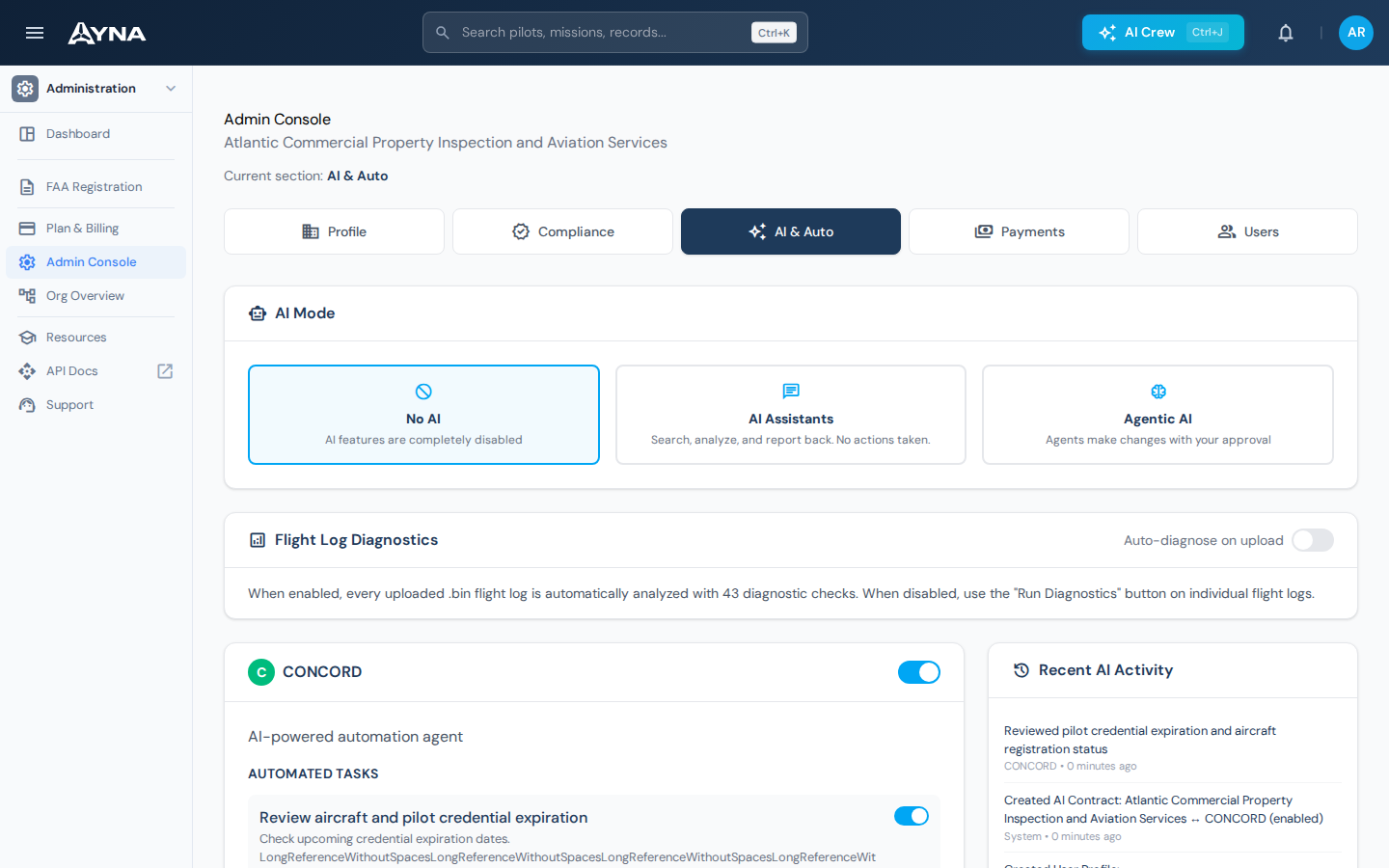
AI Assistants can search, analyze, and report without changing records. Where Agentic AI actions are enabled, agents can make changes with your approval through the available tools. Choose No AI to disable AI assistance. Your organization sets the mode; the crew does not set its own authority.
No AI · AI Assistants · Agentic AI with approval
Working in AYNA
From specialist insight to a documented next step
- 01
Start with the work
Open the lead, service, mission, aircraft, or readiness record that needs attention.
- 02
Work with the specialist
Develop the offer, prepare the mission, interpret the evidence, or decide the maintenance follow-up.
- 03
Retain the result
Review the recommendation and use enabled tools, with approval, to carry the work into AYNA’s records.
AYNA mobile app / In the field
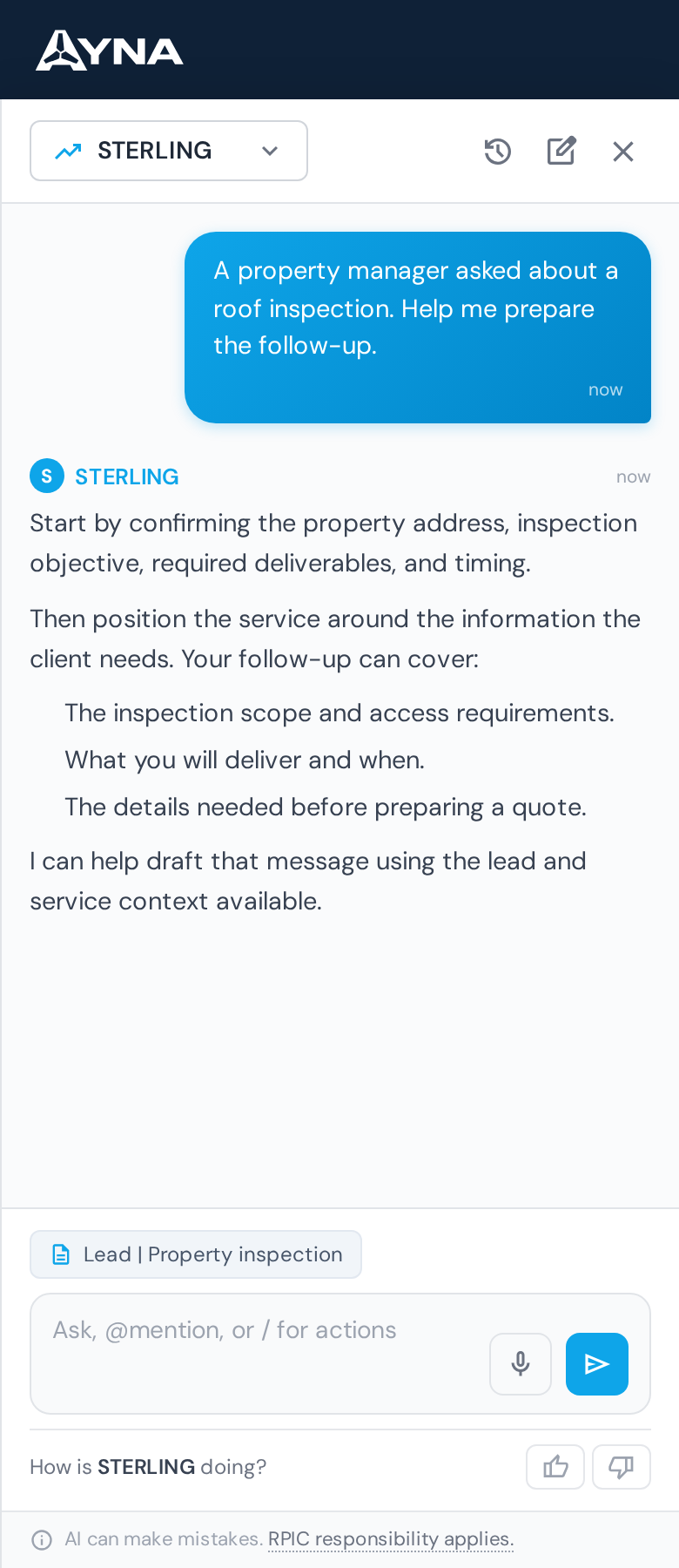
Talk to STERLING from your phone.
Ask STERLING to help develop a service, prepare a client follow-up, or think through the next step with a lead. Type in the conversation or use the microphone for push-to-talk voice input where your browser supports it.
Install AYNA on your home screen as a mobile web app (PWA). Use the same account and workspace on your phone and desktop.
How to install AYNA
On iPhone or iPad, open AYNA in Safari and select Share → Add to Home Screen. On Android, use the installation prompt or the browser menu’s Install app / Add to Home Screen option where available.
Live records and changes require a connection. Installation does not provide offline editing or queued submissions.
AI Crew & controls / Questions
Details for your operation.
How does STERLING support go-to-market work?
STERLING helps with market opportunities, service positioning, pricing, lead outreach, meeting preparation, and client follow-up. Relevant lead and service context supports the discussion.
Can TUCKER help with ArduPilot, PX4, MAVLink, and DJI aircraft?
Yes. TUCKER provides technical assistance around aircraft systems, setups, components, and maintenance using the information available. Built-in flight-log diagnostics currently analyze ArduPilot .bin logs; the available evidence and tools determine what can be concluded for a particular aircraft.
Can the crew help maintain records as well as explain them?
The connected tools include aircraft and component records, maintenance tasks, supporting records, and service work. Actions depend on the tools and permissions enabled for the organization and require the applicable approval.
Can we use specialist chat without allowing changes?
Yes. AI Assistants provide search, analysis, and reporting without taking actions. Agentic AI uses enabled actions with approval. No AI disables AI assistance.
Can I talk to the AI crew instead of typing?
Yes. Use the microphone for push-to-talk voice interaction in supported browsers. Voice mode can dictate your question and speak replies aloud. It requires microphone permission and browser speech support; text chat remains available.
Continue the work
Connected capabilities.
Pilot
Put specialist expertise alongside the work.
14-day free trial · no charge today · cancel anytime